Connectify PRO 3.5.1.24187 (NEW)

http://imagenes.es.sftcdn.net/es/scrn/90000/90383/connectify-01-353x535.png


Connectify es una utilidad que convierte tu ordenador con tarjeta Wi-Fi en un punto de acceso o repetidor de señal. Con él podrán conectarse otros dispositivos cercanos como teléfonos móviles.

Al instalar Connectify, el programa se cerciora de que tienes instalada una tarjeta inalámbrica o dispositivo que pueda convertir tu PC en un router. Hecho esto, solo tendrás que definir el nombre de red y una contraseña, cuando más complicada mejor.

La conexión se inicia entonces con el botón "Start Hotspot" y podrás ver en otras pestañas los dispositivos que aprovechan la señal. Connectify también se encarga de gestionar carpetas y ficheros compartidos, dispositivos de sistema y un sinfín de opciones que te recomendamos que pruebes.


Connectify PRO is an easy to use software router for your Windows computer that lets you transform your laptop into a Wi-Fi hotspot so you can share a single Internet connection – such as wired ethernet, a 3 or 4G card or adapter, even another Wi-Fi network – with your friends, co-workers, and mobile devices.

AT HOME:

Connectify can easily act as your primary router or even a repeater for your home router, extending its range and providing Internet access wherever you need it. Connect to your home network, enter the same Wi-Fi name and password, and hit “Start Hotspot.” Devices will automatically connect to the Internet through either your Connectify hotspot or home router depending on proximity.

Before you know it you can finally have Internet access in that impossible back room or basement. In addition, if you run Connectify away from home with these settings, any devices that need to be bound to a specific network (such as Eye-Fi cards or wireless printers) will work flawlessly with no additional configuration no matter where you are! So forget trying to mess around on the command line with ICS, Virtual Wi-Fi, or Hosted Network, just install Connectify and have a real hotspot up and running in seconds.

ON THE ROAD:

Connectify placed second in Lifehacker.com’s Top 10 Downloads for a Road Warrior Laptop and it’s not hard to see why. For the modern traveler, Internet connectivity is a lifeline. Airports, Hotels, and Coffee Shops know this and charge accordingly, often as much as $10-$15 per day, per connection! These fees can quickly add up when traveling with family, friends, or co-workers. The handful of hotels that do provide free Internet access occasionally only supply you with an ethernet jack, which leaves Wi-Fi only devices and smart phones in the dark. Even the lucky few that have mobile 3G/4G cards or USB adapters are limited to a single connection.

Connectify users can save money on multiple Wi-Fi connections while on the road and still get all their devices online simultaneously.



Connectify PRO (4 MB)
MEDIAFIRE

-----------------------------------------------------------------------------------------------------------------------

How to Activate
1. Disconnect Internet
2. Install Connectify 3.5 - Dont Restart
3. Launch Connectify 3.5 - Enter License Key

Select One to Activate Connectify 3.5 Pro

-----------------------------------------------------------------------------------------------------------------------
Email : dytoshare@student.undip.ac.id
Serial :R67LZ2-6F4SFL-H99MHK-8DE821-1QT37X-1CSJ2S-B9ZXNG-5W4LE7-7FVE4U-W7BAE6-29C3BH-RV29KB-MJFW4M-Q37WR2-64BXBG-5K4RU3
-----------------------------------------------------------------------------------------------------------------------

or

-----------------------------------------------------------------------------------------------------------------------
Email : dytoshare@alumni.undip.ac.id
Serial : DEC3SC-D8G8PS-3QLLMZ-DL9VA1-1QT3J3-1CSJ2S-B9ZXNG-5W4LE7-7FVE4U-W7BAEA-28C7NJ-FD64C3-7GRD2K-KBTFRV-DMEXLG-5GAPQ
-----------------------------------------------------------------------------------------------------------------------

4. Activate - Restart Your PC
5. Dont UPDATE PROGRAM. Enjoy.... :)

Note: Block program to check for updates. Add this line to hosts file (C:\WINDOWS\system32\drivers):

127.0.0.1 updates.connectify.me

All License created by DYTOSHARE.us : Expired 01-March-2013


Sleep as an Droid v20120612 (UNLOCKED)(NEW)(ANDROID)

Track your sleep and wake up gently with nature sounds in optimal sleep phaseAlarm clock with sleep cycle tracker. Wakes you gently in light sleep for pleasant mornings. Features: sleep graph history, sleep debt stats, sharing (FaceBook, email), nature alarms (birds, sea, storm...) with gradual volume up, music volume down when asleep, captcha, sleep talk/snoring recording


https://lh3.ggpht.com/05a9HN3X-kohmkA3cmOthgpjrxLzmttanFcm7R9Puoz96S2_6Hv5Zk90ky52h8jTjZw https://lh6.ggpht.com/OfWnHi8urTe95BSgKxQhSGJnXm8eeOmQ4grC0t6b_7jWFVjzlKRRXjLyeMOB975CZg


Requires Android: 2.1 and up


VueScan Pro 9.1.08 (UPDATE)

alt

VueScan, el software de escáner más popular del mundo, es utilizado extensivamente por los fotógrafos, los usuarios caseros, los servicios de exploración y las corporaciones.

VueScan es un programa de escánear los trabajos con la mayoría de los escáners de alta calidad del plano y de película para producir escaneos que tienen
fidelidad excelente del color y colorean el balance. Es muy fácil de utilizar, y también tiene características avanzadas para restaurar los colores descolorados y otras características usados por los fotógrafos profesionales.

VueScan no cambia nada en su sistema, no instala nada en su sistema operativo y el resto del software del escáner continuará funcionando. VueScan aumenta su productividad y le ahorra dinero. VueScan ha avanzado las opciones de escáneo, características de gran alcance, y mejora grandemente sus escáneos con exactitud superior del color y un mejor equilibrio del color. VueScan apoya más de 700 escáner y 209 archivos crudos de las cámaras digitales y tarda cerca de 5 minutos para transferir y para instalar.

VueScanVueScan, the world's most popular scanner software, is used extensively by photographers, home users, scanning services and corporations. VueScan is a scanning program that works with most high-quality flatbed and film scanners to produce scans that have excellent color fidelity and color balance.

It is very easy to use, and also has advanced features for restoring faded colors, batch scanning and other features used by professional photographers.

VueScan changes nothing on your system, installs nothing in your operating system and all other scanner software will continue to function. VueScan increases your productivity and saves you money. VueScan has advanced scanning options, powerful features, and greatly improves your scans with superior color accuracy and better color balance. VueScan supports more than 700 scanners and 209 digital camera raw files and takes about 5 minutes to download and install.


VueScan 32 bit (6.29 MB)

VueScan 64 bit (6.29 MB)


E-mailaddress:maxvlas@juniormembre.com
serial number:117288448
Customernumbre:15696209


Key Liikuri

E-mail address : tripoli@yahoo.com
Serial number : 113839860
Customer number : 513911994


PATCH / KEYGEN (0.434 MB RAR)

MEDIAFIRE


First block this app with firewall.

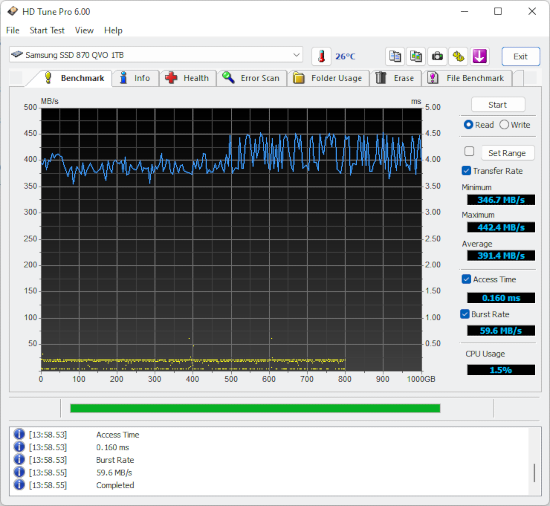
HD Tune Pro 5.0 (NEW)(RETAIL)


Los discos duros son aparatos complejos, muy proclives a fallos mecánicos. Una vigilancia periódica del estado de salud de las unidades de almacenamiento te evitará desagradables sorpresas.

HD Tune es una herramienta de diagnóstico que ayuda a comprobar el estado de los discos duros, ya sean internos, externos o extraíbles. Selecciona la unidad en el menú desplegable para que HD Tune la analice. Lo primero que verás es la temperatura del disco, también visible en la bandeja de sistema.

La primera pestaña de HD Tune contiene la prueba de rendimiento (Benchmark), que se ejecuta haciendo clic en Start y comprueba la velocidad de la tasa de transferencia; los demás parámetros sólo se recopilan en la versión Pro. Info y Health contienen, respectivamente, datos sobre la unidad e indicadores SMART, mientras que en Error Scan, la última pestaña, HD Tune ofrece un escáner de errores bastante rápido.

Como utilidad de diagnóstico -que no de reparación-, HD Tune da ampliamente la talla. La versión gratuita sufre un poco por el recorte de funciones, pero lo esencial está disponible.


HD Tune is a HD/SSD utility which contains various functions ranging from drive performance measurements to securely erasing all data. It is also capable of performing disk health checks (including scanning for errors and a temperature display).

HD Tune Pro adds the following functionality compared to the free version: low-level write performance benchmark, file benchmark, random access performance measurement and a cache test. It also sports a disk monitor, a folder view (which displays the disk usage per folder) and the ability to manipulate the AAM (Automatic Acoustic Management) settings. HD Tune supports HDs (internal or external), SDDs, USB sticks, memory cards, iPods, etc.


HD Tune Pro 5.0 (FOSI Version)
KARELIA.RU


TNod User & Password Finder 1.4.2.1 Final

Nueva versión de la utilidad que inserta una licencia válida para actualizar versiones de NOD32 Comerciales 2.5.x, 2.7.x, 3.x, 4.x, 5.0.x, 5.2.x, 6.0 Beta y 6.0 RC; incluido Eset Smart Security.

Versión lanzada debido a la suspensión de la página principal donde TNod tomaba la información (y así mantener siempre actualizada su lista de servidores).


Cambios desde la versión 1.4.2.0 Final:
  - Arreglado bug de conexión hacia el servidor tnoduse.blogspot.com (actualmente suspendido).
  - Agregado el idioma Alemán.

Este programa es libre y está protegido bajo la licencia GNU/LGPL v3.

Recomendaciones:

 - Desinstalar cualquier versión anterior.
 - Añadir a exclusión los sitios (incluyendo los asteriscos): *tukero.* y *tnoduse*
 - Añadir a exclusión el directorio donde vas a descargar TNod y donde lo vas a instalar (por defecto se instala en la carpeta C:\Program Files\ESET\TNod User & Password Finder).

Links de descarga:


Sólo Instalador / Installer Only


Versión Portable / Portable Version


Mirror List
(Cómo Acceder)
Sólo Instalador / Installer Only
Pass: tnod


Código Fuente / Source Code
(Cómo Acceder)
Desde Google Code
Repositorio Git

- Apoya a TNod con un Like -


VideoGet 2012 6.0.2.64 (NEW)


VideoGet¿Eres aficionado a ver vídeos en Internet y te gustaría descargarlos a tu PC? Seguro que sí.

VideoGet es un elaborado programa que sirve para descargar a tu PC los vídeos de decenas de páginas, como YouTube, Google Video y MetaCafe.

Además de descargar los vídeos, VideoGet te permite convertirlos a AVI, WMV e incluso dejarlos listos para pasarlos a tu iPod. De hecho, no es que te permita convertirlos, sino que directamente los guarda en el formato que le indiques, así incluso te ahorras convertirlos.

Su mayor punto en contra es que se trata de un programa de pago, pero hay que tener en cuenta que, aunque existen muchos gratuitos similares, ninguno es tan completo como éste.


VideoGetVideoGet is a tool for downloading your favorite video clips from more than 900+ video websites. It supports such websites like YouTube, MySpace, Google Video, Yahoo Video, MetaCafe, DailyMotion, AnimeEpisodes.net, DumpALink, Glumbert, Lulu TV, VSocial, PhotoBucket, Yikers, ZippyVideos and a lot more… Most of these video websites are keeping video in FLV format, and a lot of people don’t know how to playback these files. VideoGet also providing you with ability to convert each video in most popular formats for more comfortable video playback. VideoGet supports AVI, MPEG1, MPEG2, WMV, FLV, MP4, 3GP, MP3 file formats, so you will be able not only to view it, but also put it into your iPod, mobile phone or any other portable device. Furthermore you can set up video/audio quality, set up video frame rate, width / height and audio sampling rate.

VideoGet features:
• Downloads video from YouTube and more than 900 video websites.
• Converts video to variety of video formats (*.AVI, *.MPG, *.WMV, *.FLV, *.MP4, *.3GP, *.RM, *.MOV, *.MP3, *.WAV)
• Converts video to any portable video device (iPhone, iPod Video, iPod Nano, iPod Touch, PSP, Zune, iRiver Clix, AppleTV)
• One-click-download-convert. Plugins for Internet Explorer and Mozilla FireFox browser
• Script auto-updater allows you to be always in touch with latest version
• Simultaneous download supported. To make the download faster, VideoGet allows you to download up to 20 videos at the same time
• “Download while converting” feature automatically starts downloading the next video while the previous one is being converted.
• Simultaneous converting of multiple files allows to convert up to 10 videos at the same time.
• Download YouTube videos in high-quality with a new “YouTube in HQ” feature.
• Auto remove downloaded files from the list. VideoGet will automatically remove all downloaded files from the list after you close the program.
• MMS streaming media protocol supported.
• Download works through WinInet API, which is used by Internet Explorer, allows easy and fast download of Flash movies
• Allows to downloading in a batch mode with ability to save / load batch
• Allows to pause / resume all downloads or individual files per row.
• Can resume broken download instead of downloading file from the beginning
• Ability to login on YouTube due to inappropriate videos for which we need to prove we are 18+ years old
• Automatically detects which online video service you are attempting to download from
• Broken website report. Notify us about broken website by pressing a single button, and our team will fix it as soon as possible.
• Ability to setup width / height, video / audio quality, video frame rate and audio sampling rate of encoded video
• Small and compact
• Designed with “Easy-to-Use” concept. Nice, simple interface and a solid amount of options
• Works on Windows NT/2000/XP/Vista/Windows 7
• Works with all types of Internet connection
• Supported languages: English, German, French, Italian, Dutch, Spanish, Japanese, Korean, Danish, Swedish, Czech, Portuguese (Brazil), Greek, Russian, Ukrainian, Polish, Turkish, Bulgarian, Romanian, Hungarian, Arabic, Japanese, Danish, Swedish, Korean, Greek and Arabic.


VideoGet 2012 (x86/x64)(18MB RAR)
MEDIAFIRE